
When the check engine light comes on, the car already knows what it is worried about. It stores that information as a trouble code, and an OBD2 scanner is the tool that reads it. A basic scanner costs less than a single diagnostic fee at many shops, and using one takes about five minutes.
This guide shows you how to use an OBD2 scanner step by step, how to understand the codes it shows, and what to do with that information.
Quick answer
Plug the scanner into the OBD2 port under the dashboard, turn the ignition on, and select Read Codes. Write down every code and its freeze frame data, look up what each code means, and fix the cause before you clear it. Clearing a code does not repair anything, and the light will come back if the problem is still there.
- Every gasoline car sold in the US since 1996 has an OBD2 port.
- A code points to a system, not always to a single bad part.
What an OBD2 Scanner Does
OBD2 stands for On-Board Diagnostics, second generation. Your car’s computer constantly monitors sensors for the engine, transmission, and emissions system. When a reading falls outside its normal range, the computer stores a diagnostic trouble code (DTC) and often turns on the check engine light.
An OBD2 scanner connects to the car’s computer and lets you:
- Read stored and pending trouble codes
- See freeze frame data, which is a snapshot of conditions when the fault happened
- Check readiness monitors, which show whether emissions tests have completed
- View live sensor data on many tools
- Clear codes and turn off the check engine light
If you are not sure what the light itself means, start with our guide on what the check engine light means.
Types of OBD2 Scanners
| Type | What it does | Typical price |
|---|---|---|
| Basic code reader | Reads and clears engine codes | $20 to $40 |
| Bluetooth dongle + app | Codes, live data, freeze frame on your phone | $25 to $100 |
| Handheld scan tool | Codes, live data, readiness, often ABS and airbag | $60 to $250 |
| Pro bi-directional tool | Full systems, tests and resets | $300 and up |
For most drivers, a Bluetooth dongle or a mid-range handheld tool is the best value. Basic readers usually see only engine codes, not ABS, airbag, or transmission modules.
How to Use an OBD2 Scanner Step by Step
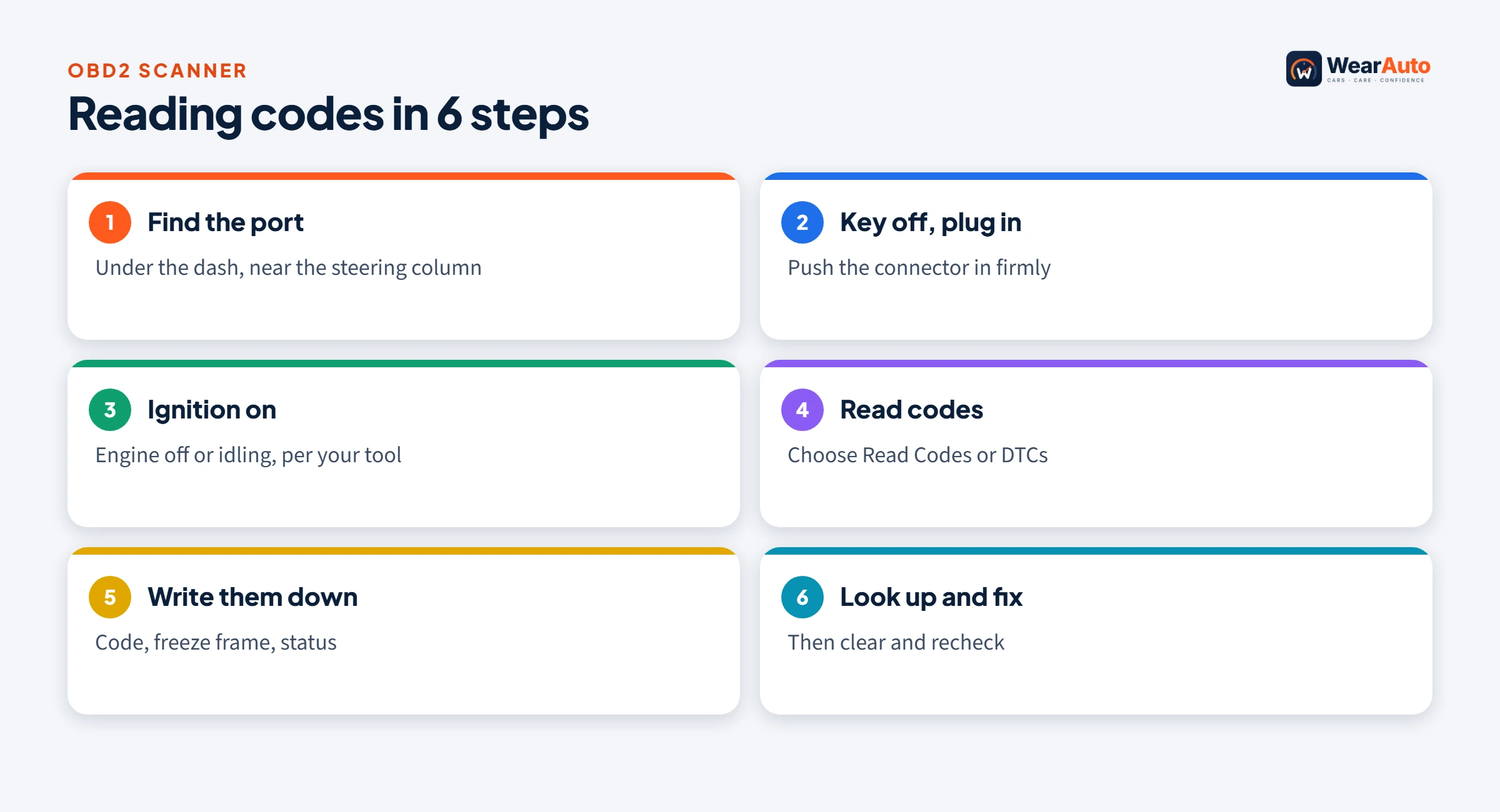
1. Find the OBD2 port
The port is a 16-pin, trapezoid-shaped connector. On most cars it sits under the dashboard on the driver’s side, near the steering column or above the pedals. Some cars hide it behind a small cover or in the center console. Your owner’s manual will show the exact spot.
2. Plug in the scanner with the key off
Turn the car off, then push the scanner’s connector firmly into the port. It only fits one way. A Bluetooth dongle may show a light when it has power.
3. Turn the ignition on
Turn the key to the On position, or press the start button without your foot on the brake. Most tools work with the engine off. Some need the engine running for live data. Follow the instructions for your tool.
4. Read the codes
Choose Read Codes, Trouble Codes, or DTCs from the menu. With a Bluetooth dongle, open the app and connect first. The tool may ask for your vehicle’s VIN, make, or model. It usually reads it automatically.
5. Record everything
Write down or screenshot every code, whether it is stored, pending, or permanent, and the freeze frame data. Freeze frame shows engine speed, temperature, load, and fuel trim at the moment the fault was logged. This context is very useful for diagnosis.
6. Look up what each code means
Enter the code in our OBD2 code lookup to see its meaning, common causes, and how serious it is. Then work from the most likely and cheapest cause up.
Look up any OBD2 code
Enter a trouble code to see what it means, common causes, and how urgent it is.
Open the code lookup →How to Read an OBD2 Code
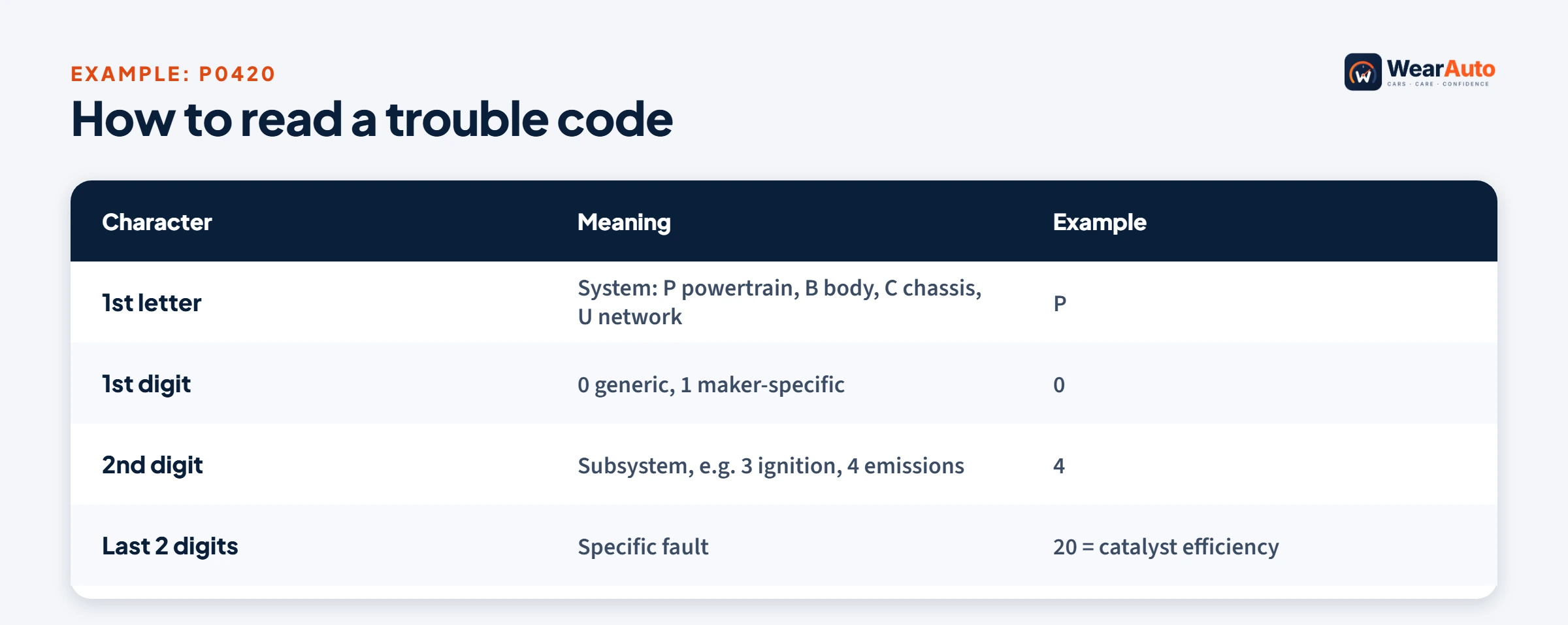
Every code has five characters. The letter tells you the system: P for powertrain (engine and transmission), B for body, C for chassis, and U for network communication. The first digit shows whether the code is generic (0) or specific to the manufacturer (1). The rest narrows it down to a specific fault.
Stored, pending, and permanent codes
- Stored (confirmed) codes have been detected enough times to turn on the light.
- Pending codes have been seen once but not confirmed yet. They are an early warning.
- Permanent codes cannot be cleared with a scanner. They clear themselves once the car confirms the repair.
A code is a clue, not a diagnosis
A code tells you what the computer saw, not always which part failed. For example, P0171 (system too lean) can be caused by a vacuum leak, a dirty mass airflow sensor, a weak fuel pump, or a bad oxygen sensor. Replacing parts based on the code alone often wastes money. Check the simple causes first.
Flashing check engine light means stop soon
A flashing light usually means a severe misfire that can damage the catalytic converter. Reduce speed, avoid hard acceleration, and get the car checked as soon as possible.
Checking Readiness Monitors and Live Data
Readiness monitors
Readiness monitors show whether the car has finished its self-tests for systems like the catalytic converter, evaporative system, and oxygen sensors. If you recently cleared codes or disconnected the battery, several monitors will show Not Ready. Many emissions tests will fail a car with too many incomplete monitors, so drive normally for a few days before your test.
Live data
Live data shows sensor readings in real time. Useful values for beginners include:
- Coolant temperature: should reach about 195 to 220°F when warm.
- Short-term and long-term fuel trim: values within about plus or minus 10% are usually normal.
- Battery or module voltage: about 13.7 to 14.7 volts with the engine running.
- Oxygen sensor voltage: the upstream sensor should switch rapidly between about 0.1 and 0.9 volts.
When to Clear Codes and When Not To
Clear a code only after you have fixed the cause, or when you want to confirm that a fault comes back. Clearing it to pass an inspection does not work, because readiness monitors reset too.
Before you clear any code:
- Record the codes and freeze frame data.
- Make the repair, such as tightening a loose gas cap or replacing a faulty sensor.
- Clear the codes with the scanner.
- Drive normally for a few days and scan again to confirm the code has not returned.
Common Codes You Might See
| Code | Meaning | Common causes |
|---|---|---|
| P0420 | Catalyst efficiency below threshold | Worn catalytic converter, oxygen sensor, exhaust leak |
| P0300 | Random misfire | Spark plugs, ignition coils, vacuum leak |
| P0171 | System too lean, bank 1 | Vacuum leak, MAF sensor, fuel pressure |
| P0455 | Large EVAP leak | Loose or bad gas cap, EVAP hose |
| P0128 | Coolant below thermostat temperature | Stuck-open thermostat |
Codes linked to poor fuel economy, such as lean conditions or bad oxygen sensors, can also explain a drop in mileage. Our guide on how to improve gas mileage covers the other common causes.
Frequently Asked Questions
Can I use an OBD2 scanner on any car?
Any gasoline car or light truck sold in the US from 1996 on, and diesel models from 1997, has an OBD2 port. European cars generally have the similar EOBD standard from 2001 for gasoline and 2004 for diesel.
Can I leave an OBD2 dongle plugged in all the time?
You can, but some dongles draw a small current that can drain the battery over days of not driving. Unplug it if the car will sit for a week or more.
Will clearing codes turn off the check engine light permanently?
Only if the problem is fixed. If the fault is still present, the computer will detect it again and the light will return, sometimes within a few minutes of driving.
Can an OBD2 scanner read ABS and airbag codes?
Basic code readers usually cannot. Many mid-range handheld tools and some app-based dongles can read ABS, airbag, and transmission codes on supported vehicles.
Is it safe to drive with the check engine light on?
If the light is steady and the car drives normally, it is usually safe to drive a short distance to get it checked. If it is flashing, or you notice overheating, low oil pressure, or a loss of power, stop driving.
The Bottom Line
Using an OBD2 scanner is one of the easiest and most useful car skills you can learn. Plug it in, read the codes, record the freeze frame data, and look up what each code means before you buy any parts. Fix the cause first, then clear the code and recheck. You will understand your car better and walk into the repair shop knowing what to ask.
Sources and further reading
- US EPA: On-Board Diagnostics (OBD)
- SAE J2012: Diagnostic Trouble Code definitions
- California Air Resources Board: OBD program
Written and fact-checked by the WearAuto Editorial Team. This guide is general information; always follow your vehicle manufacturer’s specifications and see a qualified mechanic for safety-critical repairs. See our editorial policy for how we research and update articles.