Your key fob suddenly needs to be held right next to the car. Or the buttons work only every second press. Or the dash says “key not detected.” In most cases, the fix is a new coin battery that costs a few dollars and takes about five minutes to install.
Here is how to replace a key fob battery on almost any car, how to find the right battery, and what to do if the fob still does not work afterward.
Quick answer
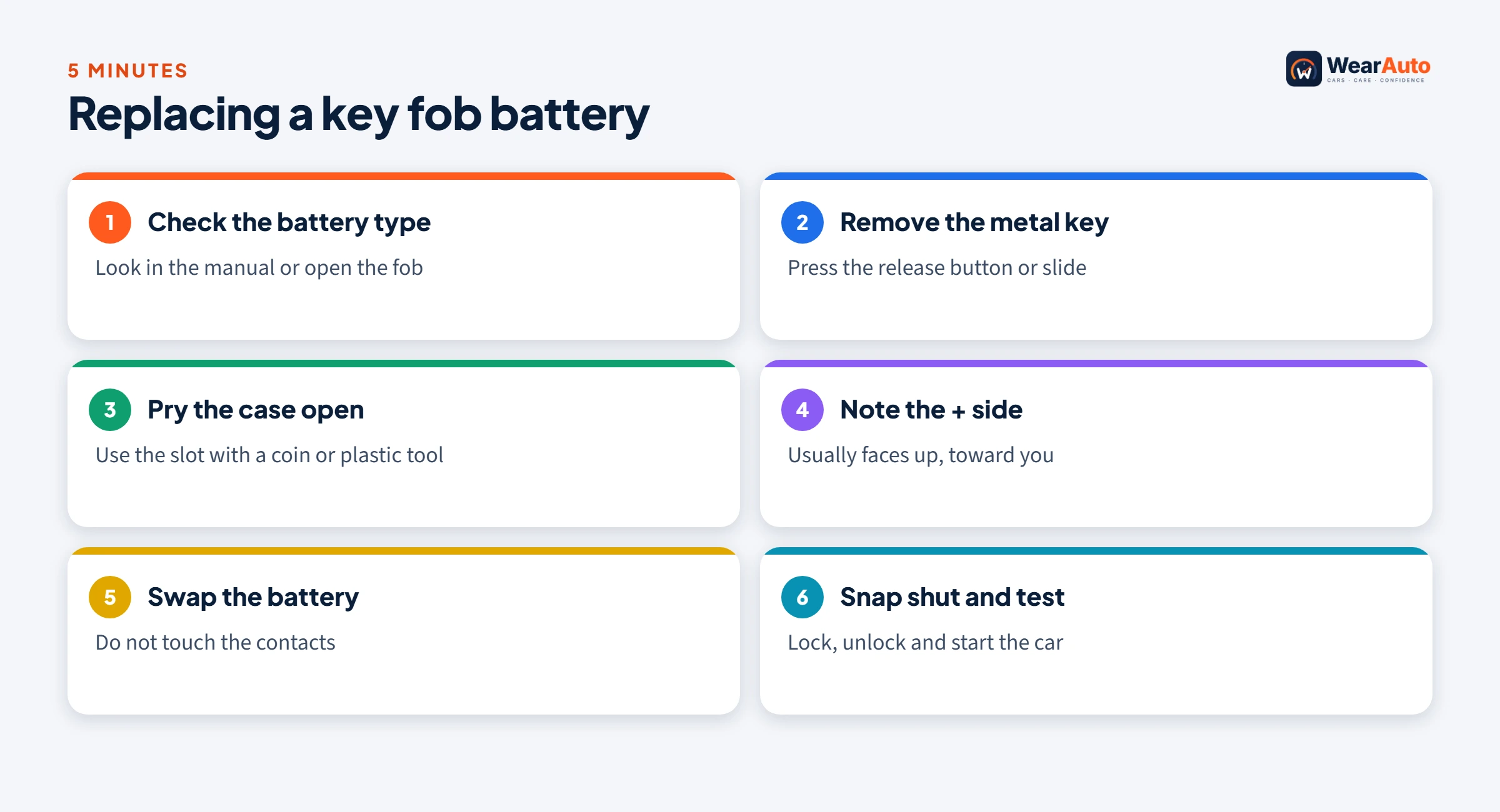
Find the battery type in your owner’s manual or on the old battery (CR2032 is the most common). Remove the mechanical key, open the fob case with a coin or plastic pry tool at the small notch on the seam, note which way the battery faces, and swap in the new one. Snap the case closed and test the lock, unlock, and start functions. Most fobs do not need reprogramming after a battery change.
- Fob batteries usually last 2 to 4 years.
- Use our key fob battery finder to look up your battery.
Signs Your Key Fob Battery Is Dying
- You need to stand closer to the car for the buttons to work
- Buttons work only after several presses
- A “key battery low” or “key not detected” message on the dash
- Push-button start works only when you hold the fob against the start button
- The small LED on the fob is dim or does not light
If the fob stopped working suddenly after being dropped or getting wet, the problem may be damage rather than the battery. A new battery is still the cheapest thing to try first.
Which Battery Does Your Key Fob Use?
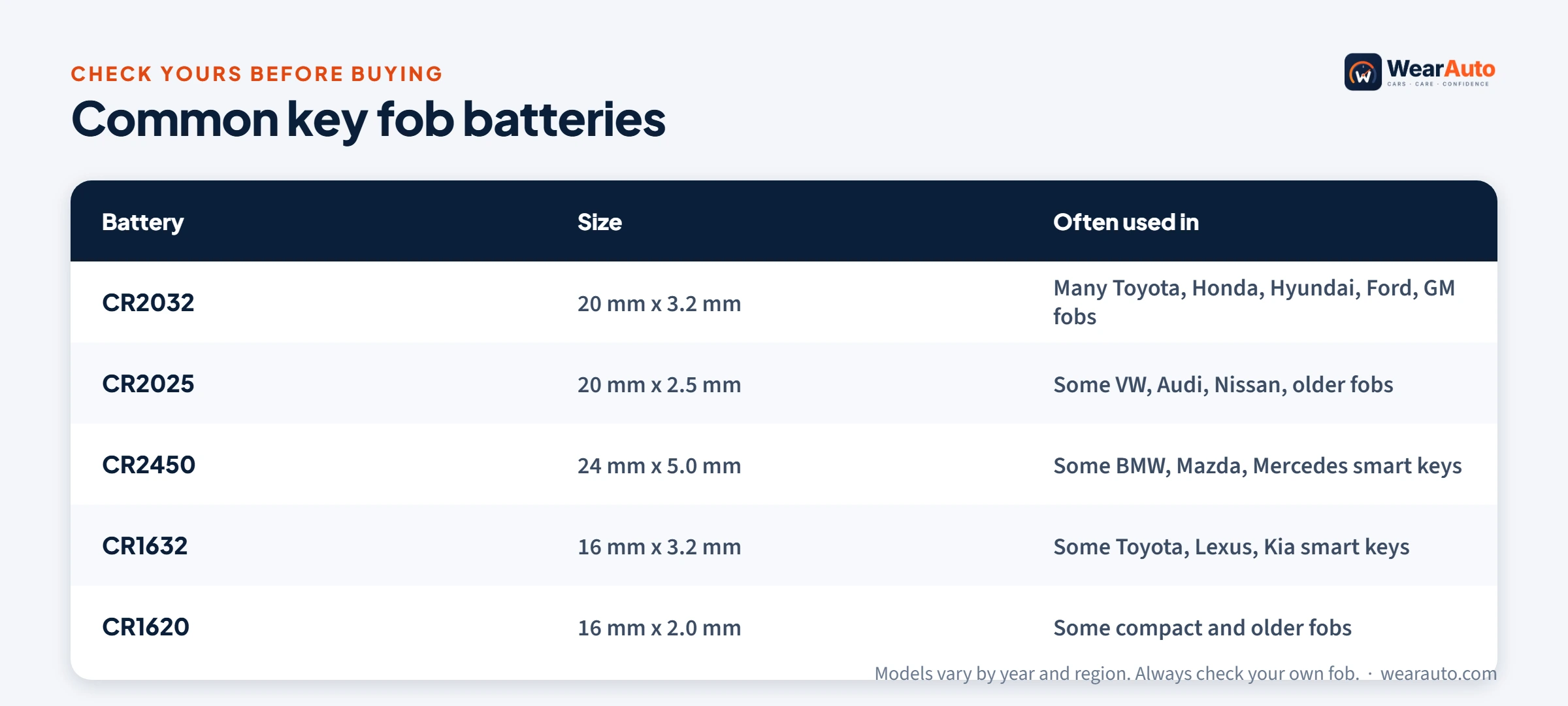
Most fobs use a flat lithium coin cell. The code is printed on the battery itself: CR means lithium, the first two numbers are the diameter in millimeters, and the last two are the thickness in tenths of a millimeter. So a CR2032 is 20 mm wide and 3.2 mm thick.
You can also check your owner’s manual or look up your make, model, and year.
Find your key fob battery
Look up the battery type for your car’s key fob by make and model.
Open the battery finder →Buy a quality brand
Cheap no-name coin cells can be weak or short-lived. Buy a reputable brand and check the expiry date on the package. Some fobs with smart-key features drain cheap batteries quickly.
How to Replace a Key Fob Battery Step by Step
What you need
- The correct replacement battery
- A small flat screwdriver, a coin, or a plastic pry tool
- A soft cloth to protect the fob from scratches
1. Remove the mechanical key
Most smart fobs hide a physical key inside. Press or slide the release button and pull the key out. On many fobs, this reveals the slot used to open the case.
2. Open the case
Look for a small notch along the seam where the two halves meet. Insert a coin, flat screwdriver, or plastic pry tool and twist gently. Work your way around the seam rather than forcing one spot. Wrapping a screwdriver tip in tape or a cloth helps avoid marks.
Some fobs have a tiny screw that must be removed first. Others have a separate battery cover that slides or twists off.
3. Note the battery orientation
Before you remove the old battery, look at which side faces up. On most fobs, the positive (+) side with the writing faces up toward you. Take a photo if you are unsure.
4. Remove the old battery
Push it out gently with a plastic tool or your fingernail. Avoid bending the metal contacts that hold it.
5. Insert the new battery
Hold the new battery by the edges, since skin oils can reduce contact. Insert it with the same orientation as the old one, pressing until it seats.
6. Close the case and test
Line up the two halves and press them together until they click all the way around. Reinsert the mechanical key. Test lock, unlock, trunk, and remote start if you have it, then make sure the car starts normally.
Keep coin batteries away from children
Lithium coin batteries can cause severe internal burns within hours if swallowed. Store new and used batteries out of reach and dispose of old ones promptly, with tape over both sides.
Fob Still Not Working After a New Battery?
- Check the orientation. A battery in upside down is the most common mistake.
- Check the contacts. Make sure the metal tabs are touching the battery. Gently bend them back if they are flattened.
- Try a different battery. New batteries can be faulty or old stock.
- Look for damage. A cracked circuit board, corroded contacts after getting wet, or worn button pads can stop a fob from working.
- Resync if required. A few older cars need a simple resync, such as turning the ignition on and off or pressing a button combination. Your owner’s manual will describe it.
- Test the spare fob. If the spare works and the main one does not, the problem is the fob, not the car.
If none of this works, a dealer or automotive locksmith can test and reprogram fobs. A replacement smart key can cost $150 to $500 or more, so it is worth trying the battery fix carefully first.
How to Start the Car With a Dead Fob
Most push-button start cars have a backup method. Holding the fob directly against the start button, or placing it in a marked slot in the center console or steering column, lets the car read the chip even when the battery is dead. Check your owner’s manual under “key fob battery discharged.” The mechanical key inside the fob opens the driver’s door.
If the car will not start even with a working fob, the issue may be the car’s own battery. Our guide on how long car batteries last explains the warning signs.
Key Fob Battery Replacement Cost
| Option | Typical cost |
|---|---|
| DIY battery replacement | $3 to $10 |
| Battery store or locksmith | $10 to $25 |
| Dealership | $25 to $75 |
| New programmed smart key | $150 to $500+ |
Frequently Asked Questions
How long do key fob batteries last?
Most last about 2 to 4 years. Smart keys with keyless entry may drain faster, since they communicate with the car more often.
Do I need to reprogram my key fob after changing the battery?
Usually not. The programming is stored in the fob’s memory and stays when the battery is removed. A few older models may need a quick resync.
Can I use a CR2025 instead of a CR2032?
They have the same diameter and voltage, but the CR2025 is thinner and may not make good contact. It can work in an emergency, but use the correct battery as soon as possible.
Why does my key fob die so fast?
Storing it near the car, especially in a hallway close to the driveway, keeps it communicating with the car and draining the battery. Low-quality batteries and a faulty fob can also cause short battery life.
Can a dead key fob stop my car from starting?
Usually not. Most cars have a backup method, such as holding the fob against the start button. Check your owner’s manual.
The Bottom Line
Replacing a key fob battery is a quick, cheap fix that solves most remote and keyless entry problems. Find the right battery, open the fob gently at its seam, match the orientation, and test everything afterward. If the fob still does not work, check the contacts and try a fresh battery before paying for a replacement key.
Sources and further reading
- Poison Control: Button battery safety
- Consumer Reports: Key fob replacement costs
- Energizer: Coin lithium battery reference
Written and fact-checked by the WearAuto Editorial Team. This guide is general information; always follow your vehicle manufacturer’s specifications and see a qualified mechanic for safety-critical repairs. See our editorial policy for how we research and update articles.